BARs are used to define the memory addresses and I/O port addresses (memory-mapped I/O) used by the PCI devices. These registers define the size of memory to be allocated, and where it can be allocated. Typically, Memory BARs must be in physical memory, whereas, I/O BARs do not have this restriction. To distinguish between them, you can check the value of the lowest bit. The following tables describe the two types of BARs
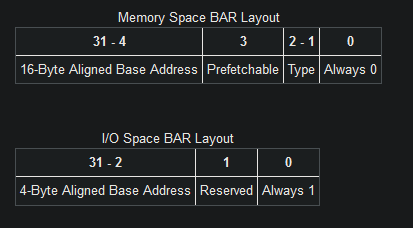
The Type field of the Memory Space BAR Layout specifies the size of the base register and where in memory it can be mapped.
0x02 in the Type field means the address is 32-bit, 0x00 means the address is 64-bit and 0x01 is Reserved.
A 64-bit base address register consumes 2 of the base address registers available.
When you want to retrieve the actual base address of a BAR, be sure to mask the lower bits.
For 16-Bit Memory Space BARs, you calculate:
(BAR & 0xFFF0)For 32-Bit Memory Space BARs, you calculate:
(BAR & 0xFFFFFFF0)For 64-Bit Memory Space BARs, you calculate:
((BAR & 0xFFFFFFF0) + ((BAR[x+1] & 0xFFFFFFFF) << 32))For I/O Space BARs, you calculate:
(BAR & 0xFFFFFFFC)To determine the amount of address space needed by a PCI device:
- Save the original value of the BAR.
- Write a value of all 1’s to the register.
- Read it back.
- The amount of memory can then be determined by masking the information bits, performing a bitwise NOT (’~’ in C), and incrementing the value by 1.
- The original value of the BAR should then be restored.
The BAR register is naturally aligned and as such you can only modify the bits that are set. For example, if a device utilizes 16 MB it will have BAR0 filled with 0xFF000000 (0x01000000 after decoding) and you can only modify the upper 8-bits.