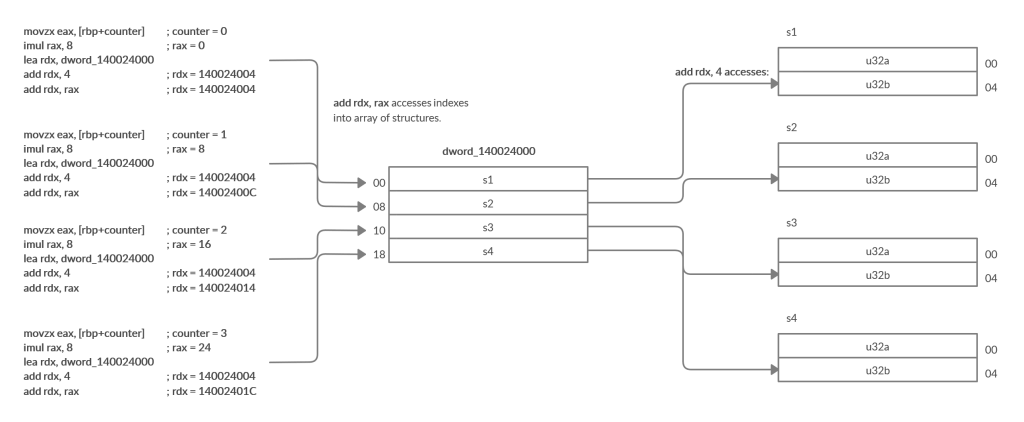
The reason being familiar with a language like C or C++ is important is because sometimes you’ll run into assembly that accesses a data structure that isn’t an array, and its layout isn’t immediately obvious. Take the below structure for example:
struct _s

{

u32 first;

u32 second;

};
When a structure like this is allocated, whether on the stack or the heap, accessing may not be intuitive. For the above example, it’s similar to the array accesses. Take note of a few things, however. This structure is not 32-bits in size, it is 64-bits because it contains two 32-bit integers. So how would we go about accessing the first or second members of this structure _s? Let’s take a small program to help us.
struct _s temp;

temp.first = 0;

temp.second = 1;

printf( "%d %d\n", temp.first, temp.second ); // 0 1
In order to initialize the first member of the temp structure, we’d need the base of it. Once we have the base it’s very much like an array where the second member would be at the base address + sizeof(first member). For the _s structure both members are 32-bit integers so the offset would be 4. The instructions to initialize these two would look similar to this.
lea rdx, qword ptr [_s]

mov dword ptr [rdx+0], 0

mov dword ptr [rdx+4], 1
Knowing how structures are accessed is sufficient for this example, but there’s something off about the assembly we’re looking at. I’ll bring it back into view.
movzx   eax, byte ptr [rbp+counter]

movzx   eax, al

imul    rax, 8

lea     rdx, dword_140024000

add     rdx, 4

add     rdx, rax

mov     eax, [rdx]

mov     edx, [rbp+108h]

cmp     eax, edx

jnz     short loc_140001404
You might’ve noticed the lea rdx, dword_140024000 instruction. This is quite confusing since our counter is currently 0, we’re multiplying the counter value by 8, loading rdx with the base of some data structure, and then adding 4 to the base then also adding 8. When you encounter sequences like this writing it out in generic terms helps. Let’s do that.
eax = 0

rax * 8 = 0

rdx = 140024000

<add rdx, 4>

rdx = 140024004

<add rdx, 0>

rdx = 140024004

<mov eax, [rdx]>

eax = *(u32*)140024004

edx = [rbp+108h]
RECALL: [rbp+108h] is the return value of sub_1400014A4
To me, it looks like structure access and then comparing one of the members to the return value of sub_1400014A4. We can observe the pattern similar to our structure access example here:
lea rdx, dword_140024000

add rdx, 4
Then what is the scaling of the counter with 8 for? Great question. This is because this data structure is actually an array of structures! Something that you’ll see quite often in the wild. If you’re wondering what I mean by an array of structures picture the earlier example but as an array of _s structs. You’d recognize it in C – check it out.
static struct _s sarr[ N ] = {

{ 0, 1 },

{ 2, 3 },

{ 4, 5 },

...etc...

{ X, X+1},

};
The elements of this array are _s structures and are initialized inside of the static array using {}. This relates to our disassembly because these structures are 8-bytes in size and our array of structures, therefore, is operated on in memory as being an array of 64-bit integers. Remember that when attempting to get the next element of an array when the elements are 8-bytes in size you have to add 8 * the index – just like in our target function:
movzx eax, byte ptr [rbp+counter]

movzx eax, al

imul rax, 8
On the first iteration, this scale value is 0 meaning that it will read from the first element in the array of structures! We load the base of the data structure into rdx:
lea     rdx, dword_140024000

add     rdx, 4

add     rdx, rax
Add 4 to rdx which is the offset into the structure for the second member, and then add the scale value to rdx. Realistically these two add operations could be swapped and would be more intuitive, but assembly isn’t always intuitive. If it helps, I put together a diagram to represent this array of structures. We know that there are 4 structures in this array of structures based on the condition of our function loop and that the size of these structures is 8 bytes, and judging by the index into it with 4 the members of that structure are likely 32-bit integers. Study the illustration below and try to connect the dots.