IO Control Codes (IOCTLs) are our primary search target as they include numerous important details we need to know. They are represented as DWORDs but each of the 32 bits represent a detail about the request — Device Type, Required Access, Function Code, and Transfer Type. Microsoft created a visual diagram to break these fields down:
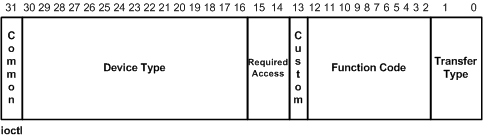
- Transfer Type - Defines the way that data will be passed to the driver. These can either be
METHOD_BUFFERED,METHOD_IN_DIRECT,METHOD_OUT_DIRECT, orMETHOD_NEITHER. - Function Code - The internal function to be executed by the driver. These are supposed to start at 0x800 but you will see many starting at 0x0 in practice. The Custom bit is used for vendor-assigned values.
- Device Type - The type of the driver’s device object specified during IoCreateDevice(Secure)(). There are many device types defined in Wdm.h and Ntddk.h, but one of the most common to see for software drivers is
FILE_DEVICE_UNKNOWN (0x22). The Common bit is used for vendor-assigned values.
An example of what these are defined as in the driver’s headers is:
#define MYDRIVER_IOCTL_DOSOMETHING CTL_CODE(0x8000, 0x800, METHOD_BUFFERED, FILE_ANY_ACCESS)It is entirely possible to decode these values yourself, but if you’re feeling lazy like I often am, OSR has their online decoder and the !ioctldecode Windbg extension has worked great for me in a pinch. These specifics will become more important when we write the application to interface with the target driver. In the disassembler, they will still be represented in hex.