There are mainly two strategies when it comes to deploying apps into production with zero downtime:
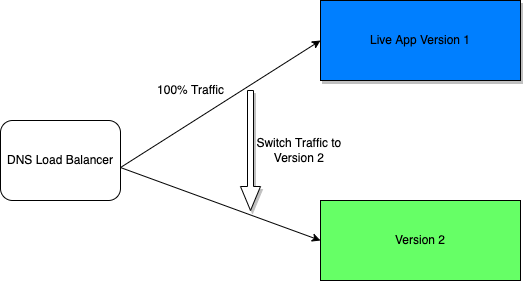
- Blue/Green Deployment:- It reduces downtime and risk by running two identical production environments called Blue and Green. So, instead of updating the current production (blue) environment with the new application version, a new production (green) environment is created. When it’s time to release the new application, version traffic is routed from the blue environment to the green environment. So, if there are any problems, deployment can be easily rolled back.
- Rolling Updates:- This is a basic strategy that is about adding a new code to the existing deployment. The existing deployment becomes a heterogeneous pool of all the old versions and a new version, with the end goal of slowly replacing all old instances with new instances.
In Kubernetes, rolling updates are the default strategy to update the running version of our app.
It’s a good practice add annotations to deployments, this is helpful on failures where rollbacks are necessary:
$ kubectl annotate deployment.apps/demo-app kubernetes.io/change-cause="demo version changed from 1.0 to 2.0"To rollback:
$ kubectl rollout history deployment.apps/demo-app

deployments "demo-app"

  REVISION    CHANGE-CAUSE
  1           "from file demo-app.yml"
  2           "demo version changed from 1.0 to 2.0"
  3           "demo version changed from 2.0 to 3.0"
$ kubectl rollout undo deployment.apps/demo-app --to-revision=2https://blog.saeloun.com/2022/06/06/kubernetes-rollback.html