Good Example:
https://github.com/Artemmkin/terraform-kubernetes
example of main.tf
provider "aws" {
	region = "us-east-1"
	access_key = "JKASJDASJASLKDJLASKDJLASKDJ"
	secret_key = "SFSDF234ALK4HJFSDJKLJ23LK43"
}

resource "<provider>_<resource_type>" "name" {
	key = "value"
	key2 = "another value"
}
https://www.youtube.com/watch?v=SLB_c_ayRMo
https://www.brainboard.co/solution-for/personas/dev-ops#
DATA & VARIABLE
Basically, data is used for dynamic content that is not controlled by terraform itself. You can think of this as the terraform live querying info from the provider. On the other hand, variable is a static info, controlled and stored/know by terraform (tfstates files)
locals {
 ami  = "ami-0d26eb3972b7f8c96"
 type = "t2.micro"
 tags = {
   Name = "My Virtual Machine"
   Env  = "Dev"
 }
 subnet = "subnet-76a8163a"
 nic    = aws_network_interface.my_nic.id
}

resource "aws_instance" "myvm" {
 ami           = local.ami
 instance_type = local.type
 tags          = local.tags

 network_interface {
   network_interface_id = aws_network_interface.my_nic.id
   device_index         = 0
 }
}

resource "aws_network_interface" "my_nic" {
 description = "My NIC"
 subnet_id   = var.subnet

 tags = {
   Name = "My NIC"
 }
}
https://developer.hashicorp.com/terraform/language/values/variables
Use variable definitions (**.tfvars**) files
- To set lots of variables, it is more convenient to specify their values in a variable definitions file (with a filename ending in either
.tfvarsor.tfvars.json). - Specify that file on the command line with
var-file:
terraform apply -var-file=”testing.tfvars”- Terraform also automatically loads a number of variable definitions files if they are present.
- It is always suggested to pass variables for a password, secret key, etc. locally through* -var-file* rather than saving it inside terraform configurations or on a remote location version control system.
Use **Sensitive** flag variables
- Terraform configuration often includes sensitive inputs, such as passwords, API tokens, or Personally Identifiable Information (PII).
- With
sensitiveflag, Terraform will redact the values of sensitive variables in console and log output, to reduce the risk of accidentally disclosing these values. sensitiveflag helps prevent accidental disclosure of sensitive values, but is not sufficient to fully secure your Terraform configuration.
**variables.tf** example:
variable "db_password" {
  description = "Database administrator password."
  type        = string
  sensitive   = true
}
OUTPUT VALUES
output "instance_public_ip" {
  description = "Public IP of EC2 instance"
  value       = aws_instance.web_server.public_ip
}
MULTIPLE FILES
Terraform evaluates all of the configuration files in a module, effectively treating the entire module as a single document. Separating various blocks into different files is purely for the convenience of readers and maintainers, and has no effect on the module’s behavior.
https://developer.hashicorp.com/terraform/language/files
Terraform always runs in the context of a single root module. A complete Terraform configuration consists of a root module and the tree of child modules (which includes the modules called by the root module, any modules called by those modules, etc.).
- In Terraform CLI, the root module is the working directory where Terraform is invoked. (You can use command line options to specify a root module outside the working directory, but in practice this is rare. )
WORKSPACES
Terraform starts with a single, default workspace named default that you cannot delete. If you have not created a new workspace, you are using the default workspace in your Terraform working directory.
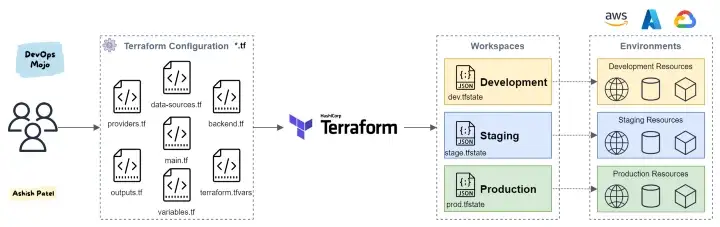
# Create new workspace
terraform workspace new Production
terraform workspace select Production

# Create deployment plan
terraform plan -out prod.tfplan

# Apply the deployment
terraform apply "prod.tfplan"
For Local state, Terraform stores the workspace states in a directory called terraform.tfstate.d
. Within that, it creates a sub-directory for every workspace and sub-directories contain individual state files for the particular workspace. All state files are stored in /.terraform.state.d/<workspacename>. This directory should be treated similarly to local-only terraform.tfstate.
Referencing the current workspace is useful for changing behavior based on the workspace. For example, for non-default workspaces, it may be useful to spin up smaller cluster sizes. For example:
resource "aws_instance" "example" {
  count = "${terraform.workspace == "default" ? 5 : 1}"

  # ... other arguments
}
Another popular use case is using the workspace name as part of naming or tagging behavior:
resource "aws_instance" "example" {
  tags = {
    Name = "web - ${terraform.workspace}"
  }

  # ... other arguments
}