Backup workflow
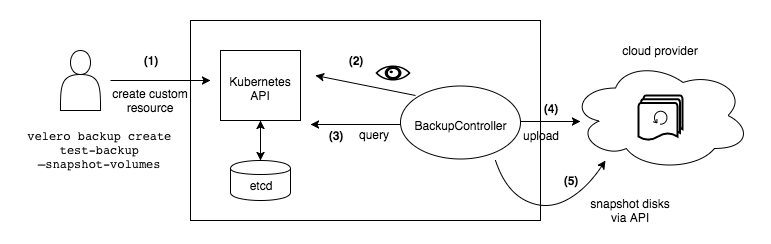
When you run velero backup create test-backup:
- The Velero client makes a call to the Kubernetes API server to create a
Backupobject. - The
BackupControllernotices the newBackupobject and performs validation. - The
BackupControllerbegins the backup process. It collects the data to back up by querying the API server for resources. - The
BackupControllermakes a call to the object storage service – for example, AWS S3 – to upload the backup file.
Set a backup to expire
When you create a backup, you can specify a TTL (time to live) by adding the flag --ttl <DURATION>. If Velero sees that an existing backup resource is expired, it removes:
- The backup resource
- The backup file from cloud object storage
- All PersistentVolume snapshots
- All associated Restores
The TTL flag allows the user to specify the backup retention period
with the value specified in hours, minutes and seconds in the form --ttl 24h0m0s. If not specified, a default TTL value of 30 days will be applied.
https://velero.io/docs/v1.6/how-velero-works/
Exemplo backup por namespace:
https://docs.pivotal.io/tkgi/1-9/velero-stateless-ns.html