The first concept that needs to be understood is that the entire virtual memory space is split into two relevant parts: Virtual memory space reserved for user processes (user space) and virtual memory space reserved for system processes (kernel space), as shown below:
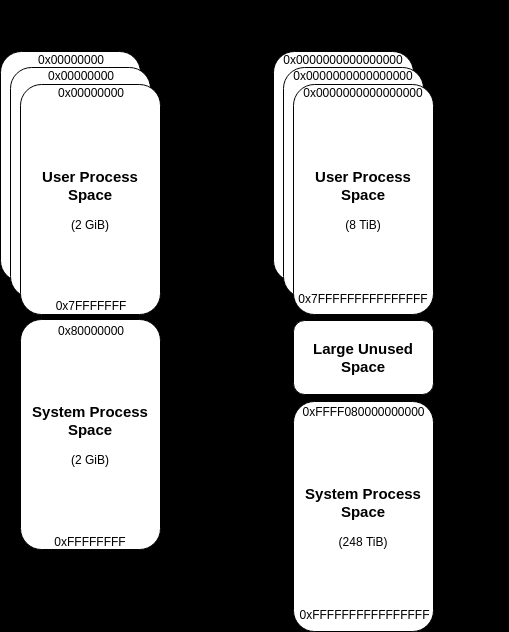
The first takeaway from this is that each process gets its own, private virtual address space, where the “kernel space” is kind of a “shared environment”, meaning each kernel process can read/write to virtual memory anywhere it wants to. Please note the latter is only true for environments without Virtualization-based Security (VBS), but that’s a different topic.
https://docs.microsoft.com/en-us/windows-hardware/drivers/gettingstarted/virtual-address-spaces
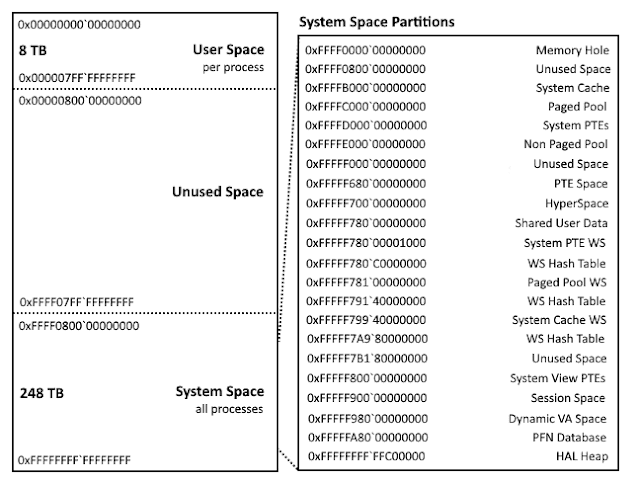
The virtual addresses for the kernel-mode regions may not be true on Windows 10, where these regions are subject to address space layout randomization (ASLR). Credits to Alex Ionescu for specific kernel space mappings.
A tree of virtual memory: the VAD (KERNEL)
Each process has a VAD tree that can be located in the VadRoot member of the before mentioned EPROCESS structure. The tree is a balanced binary search tree (The tree itself is a self-balancing binarytree: at any given node, memory addresses lower than thosecontained at the current node can be found in the left subtreeand higher ranges in the right), with each node representing a region of virtual memory within the process.
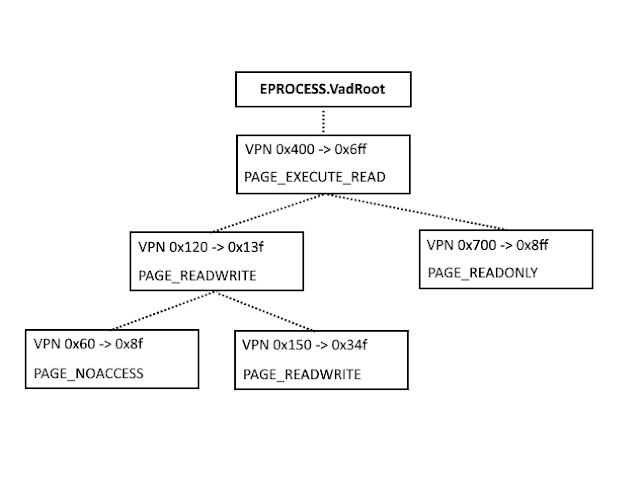
The Virtual Address Descriptor tree is used by the Windowsmemory manager to describe memory ranges used by a process as they are allocated. When a process allocatesmemory with VirutalAlloc, the memory manager creates anentry in the VAD tree. The corresponding page directory andpage table entries are not created until the process tries to ref-erence that memory page, which can provide significantmemory savings for processes that allocate a large amountof memory but access it sparsely
Walking the tree is simply a matter of identifying the _EPROCESS structure (kernel) for the process of interest, locating the VadRoot member (offset 0x194 in Windows 2000 SP4, 0x11c in all ver-sions of XP), and then following each link to the left and rightsubtrees until the entire tree is traversed. All addresses arevirtual, so the page directory for the process is also needed in order to successfully read the tree.