JTAG + GDB
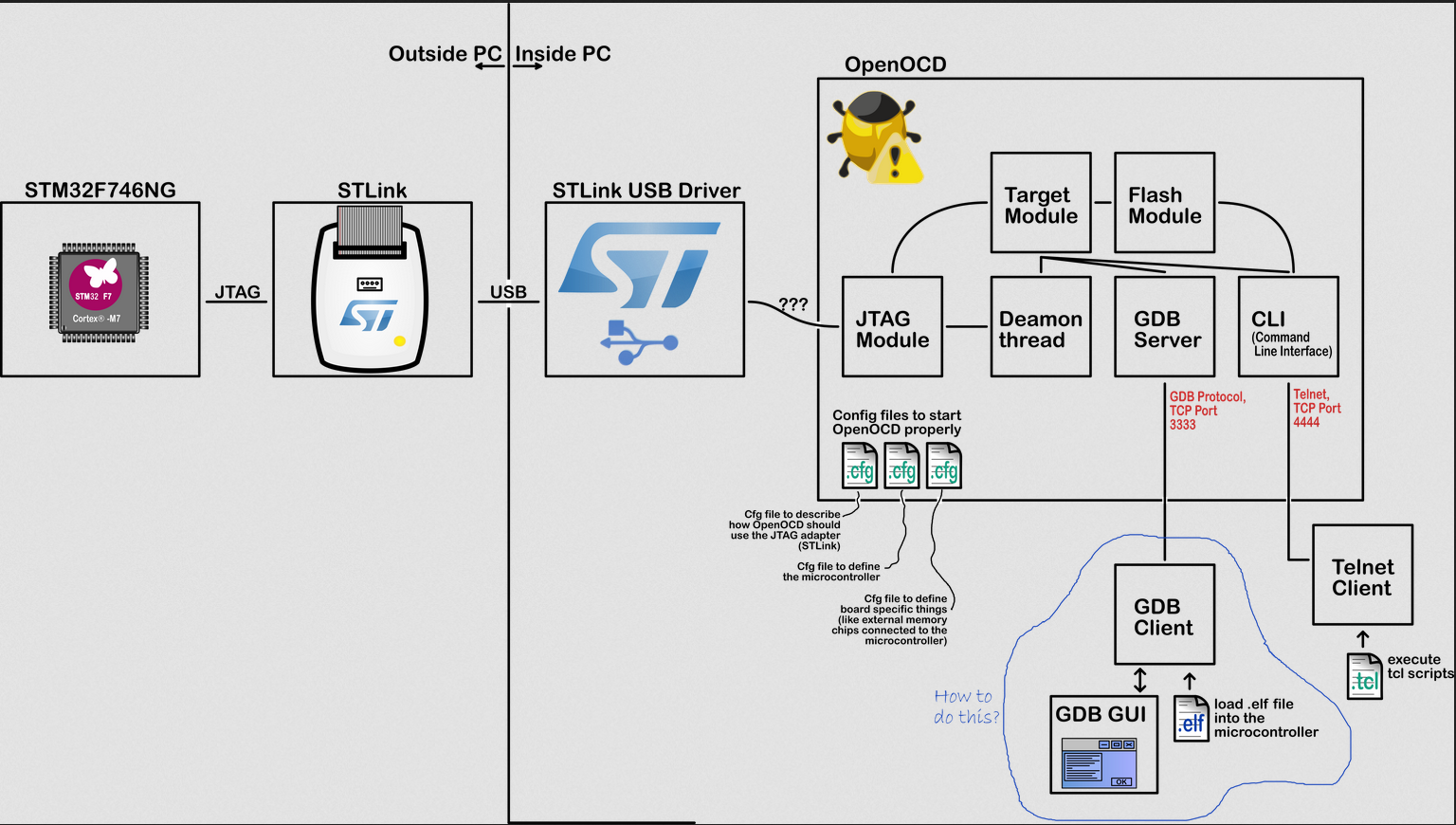
- provides some configuration files to OpenOCD - such that OpenOCD knows how to connect to your microcontroller. ‘How to connect’ is not a trivial thing. OpenOCD needs to find the proper USB driver to connect to the JTAG adapter (for example STLink). Both the JTAG adapter and its USB driver are usually delivered by your chip manufacturer (for example STMicroelectronics). Eclipse also hands over a configuration file to OpenOCD that describes the specifications of the microcontroller. Once OpenOCD knows about all these things, it can make a reliable JTAG connection to the target device.
- OpenOCD starts two servers. The first one is a Telnet server on TCP port 4444. It gives access to the OpenOCD CLI (Command Line Interface). A Telnet client can connect and send commands to OpenOCD. Those commands can be a simple ‘stop’, ‘run’, ‘set breakpoint’, …
- Such commands could be sufficient for debugging your microcontroller, but many people were already familiar with the Gnu Debugger (GDB). This is why OpenOCD also starts a GDB server on TCP port 3333. A GDB client can connect to that port, and start debugging the microcontroller!
https://scrobotics.es/2020/03/25/debugging-a-cortex-m-microcontroller/